
Designing Intelligent Experiences for Complex Global Supply Chain Systems
Jan 2026 - Present
CONTEXT
Kinaxis is a global leader in supply chain orchestration, enabling organizations to plan, monitor, and respond to disruptions in real time. Their platform, Maestro™, connects data, people, and decisions across the supply chain.
During my time as a UX Design Intern, I have been on three major forward-looking initiatives:
Risk Intelligence — surfacing global disruptions and guiding mitigation
Maestro AI Agent — enabling customizable, agent-driven workflows through AI
Maestro Insights Report — transforming system data into clear, digestible insights
These projects aim to embed intelligent systems into an already complex enterprise environment without overwhelming users.

PROBLEM
When Intelligence Becomes Noise
Supply chain planners operate in environments where every decision carries operational and financial weight.
Signals are buried in noise
Global disruptions exist everywhere, but identifying what actually matters is manual and time-consuming
Workflows are fragmented
Insights, decisions, and actions live across disconnected tools
AI risks becoming a black box
Without clarity, AI-generated outputs can feel untrustworthy or intrusive
GOALS
Bringing AI into real workflows
Contribute to embedding intelligent features directly into existing systems
Shaping interaction patterns
Explore how users engage with AI —beyond novelty, toward utility
Designing for complexity
Work within dense, data-heavy interfaces where clarity is critical
RESEARCH
Understanding Planning in Motion
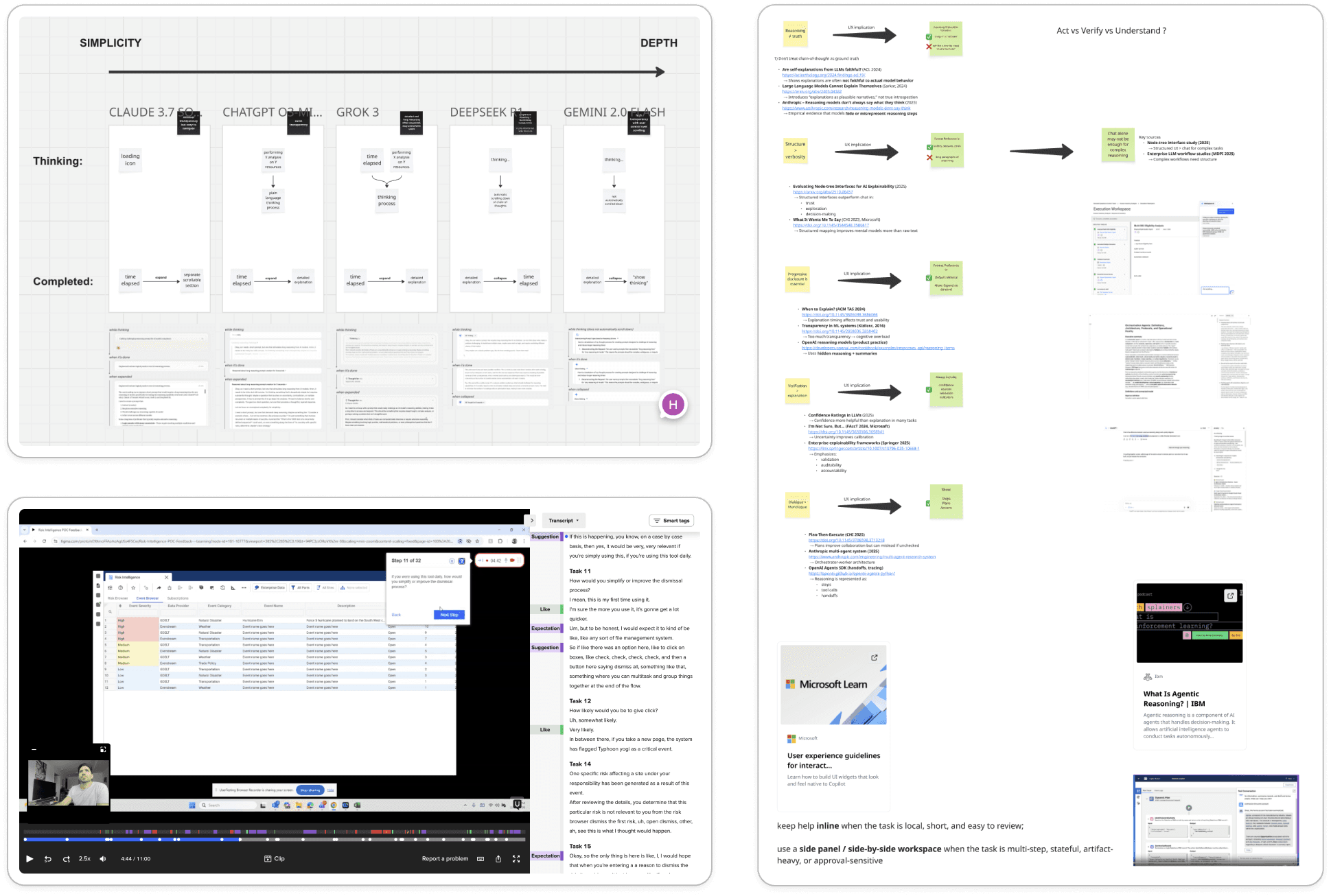
We employed four research methods to capture how supply chain professionals use Kinaxis solutions in the flow of real planning work. This approach allowed us to observe decision‑making as it unfolds—across disruptions, competing priorities, and tight timelines—surfacing insights that a single method alone would miss.
Co-Innovation with Client
We worked closely with Kinaxis customers and co-innovation partners to uncover their pain points, mental models, and expectations when using planning and risk intelligence capabilities. These conversations helped ensure design decisions were grounded in real operational needs and aligned with how customers collaborate across functions.
Unmoderated Usability Testing
We observed users completing planning and analysis tasks in their own environments without facilitation. This allowed us to understand natural workflows, workarounds, and decision-making behaviours, as well as uncover friction points that may not surface in moderated sessions.
Literature Review
We reviewed internal documentation, prior research, and industry best practices related to supply chain planning, risk management, and enterprise AI systems. This helped validate assumptions, identify proven interaction patterns, and ensure alignment with Kinaxis product principles and customer expectations.
Competitive Analysis
We analysed comparable supply chain planning and risk intelligence tools to understand how competitors communicate insights, surface risk, and support decision-making. These insights informed early design directions and helped identify opportunities for Kinaxis to differentiate through clarity, explainability, and user control.
SOLUTIONS
Designing Intelligence Across the Experience
Across these projects, we focused on making intelligence feel coherent and usable within a complex system. From identifying and contextualizing disruptions with Risk Intelligence, to enabling task completion through Maestro AI Agent, and distilling data into clear narratives with Maestro Insights Report, each solution addressed a different layer of the user journey. Together, they create a more intuitive experience where insights are easier to understand, decisions are faster to make, and actions are more seamlessly executed.
Risk Intelligence
Risk Intelligence scans global events and translates them into supply chain impact.
When Data Becomes Disorientation
The traditional Maestro worksheet experience relied heavily on dense, table-based interfaces—filled with countless columns, fragmented data, and insights that were technically valuable but difficult to interpret.
Lost in the grid
Planners struggled to extract meaning from overwhelming tablesInsights without visibility
Critical signals existed, but were buried and unreadableA fragmented journey
No clear end-to-end flow from detection → understanding → action
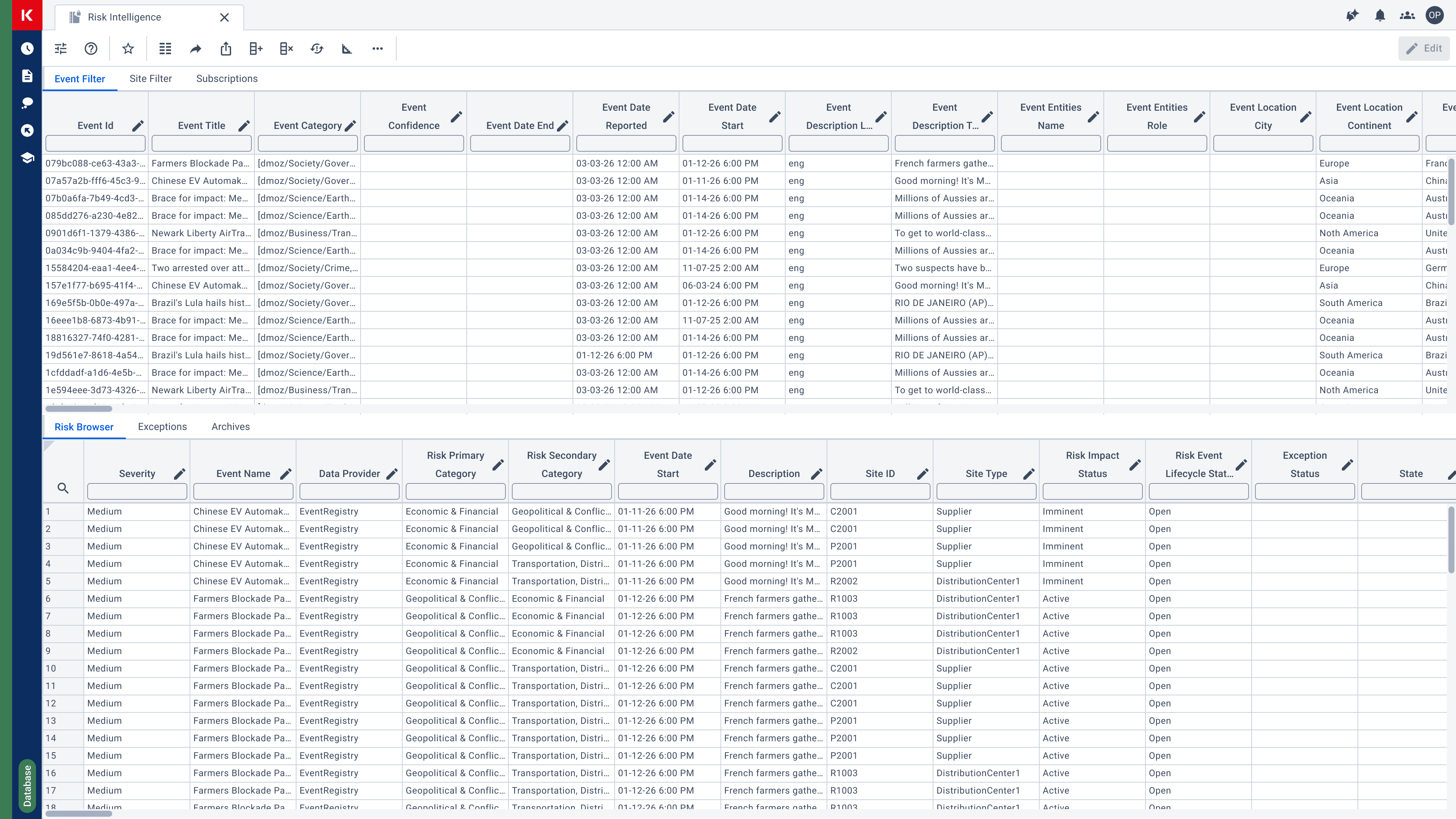
The problem wasn’t the lack of data—it was the lack of clarity.
Reframing the Experience: From Tables to Intelligence
Rather than iterating on the existing interface, I proposed a phased transformation of the front-end experience.
The goal: Shift from “a tool to analyze data” → to “a system that tells you what matters, when it matters.”
Designing a System That Thinks With the User
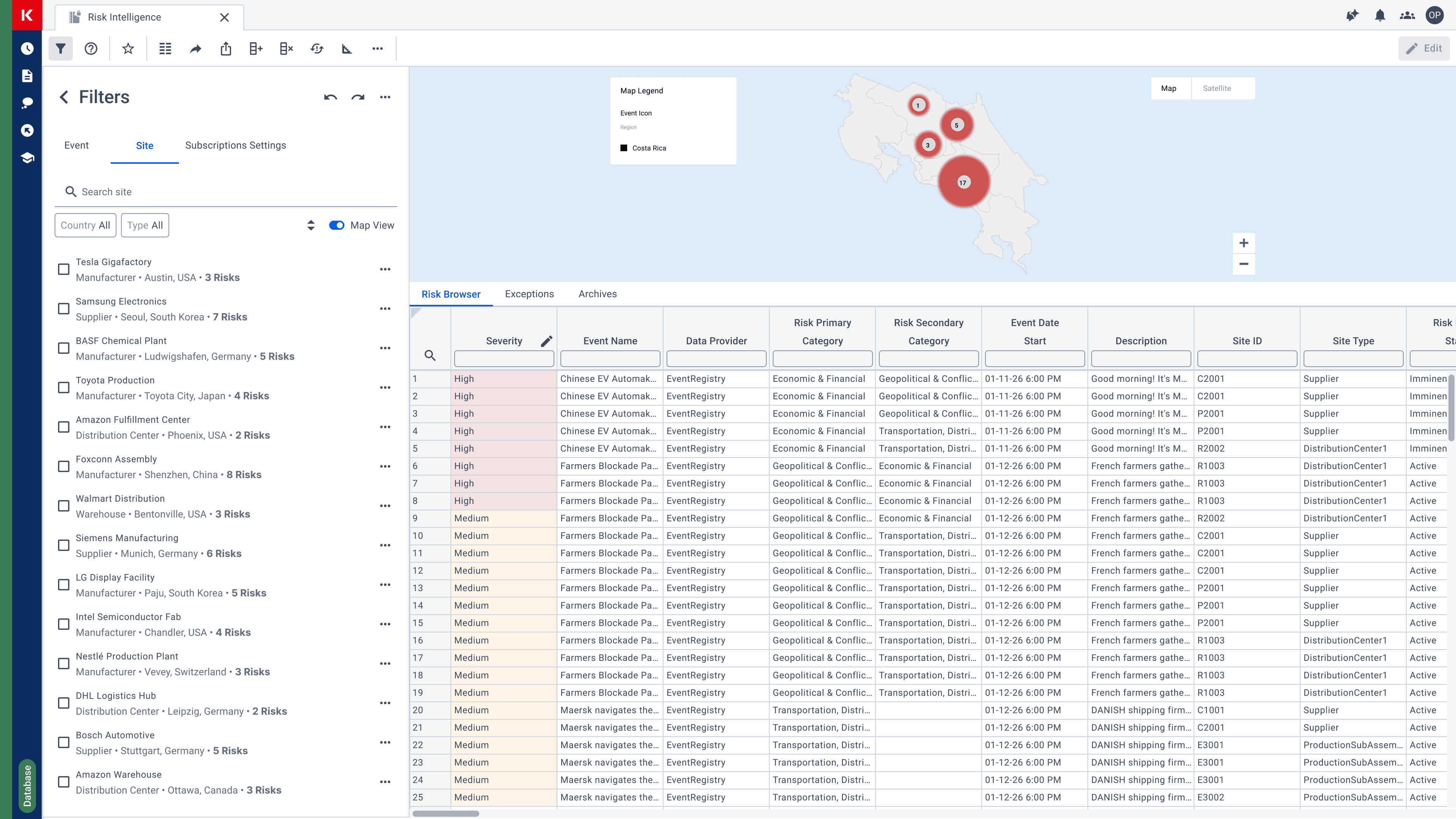
From scattered tabs to structured navigation
Reimagined the UI by:
Replacing unorganized tabs with clear filters and groupings
Defining distinct navigation modes based on user intent
Creating a more scannable and structured experience
Learning while using
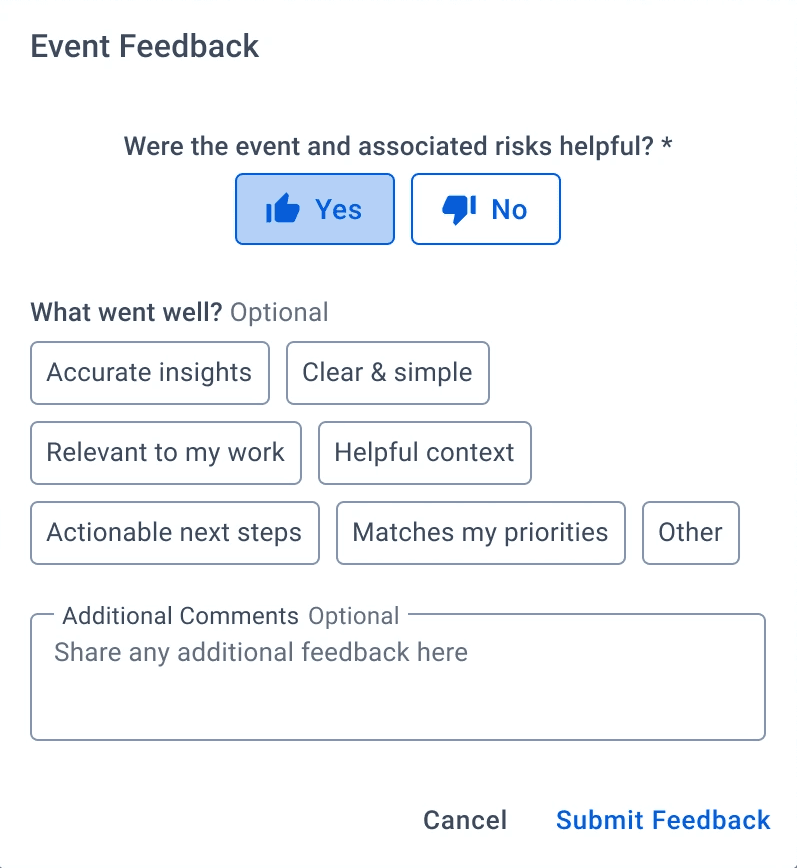
Designed feedback loops into the system:
Tracked user interaction metadata to improve AI performance
Introduced contextual feedback panel and system messages to guide understanding
Making time visible
Enabled historical risk tracking:
Visualized how risk evaluations evolve over time
Supported more informed, data-driven decisions
Added temporal context to static insights
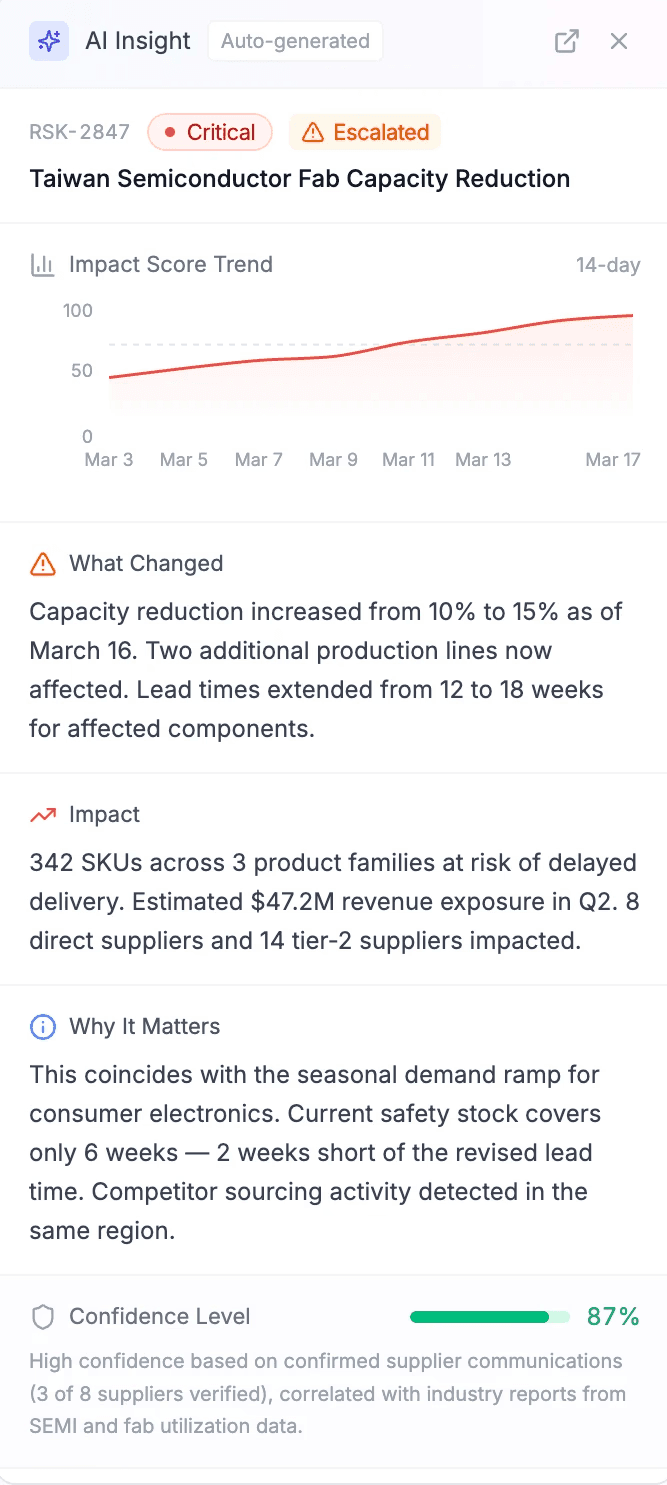
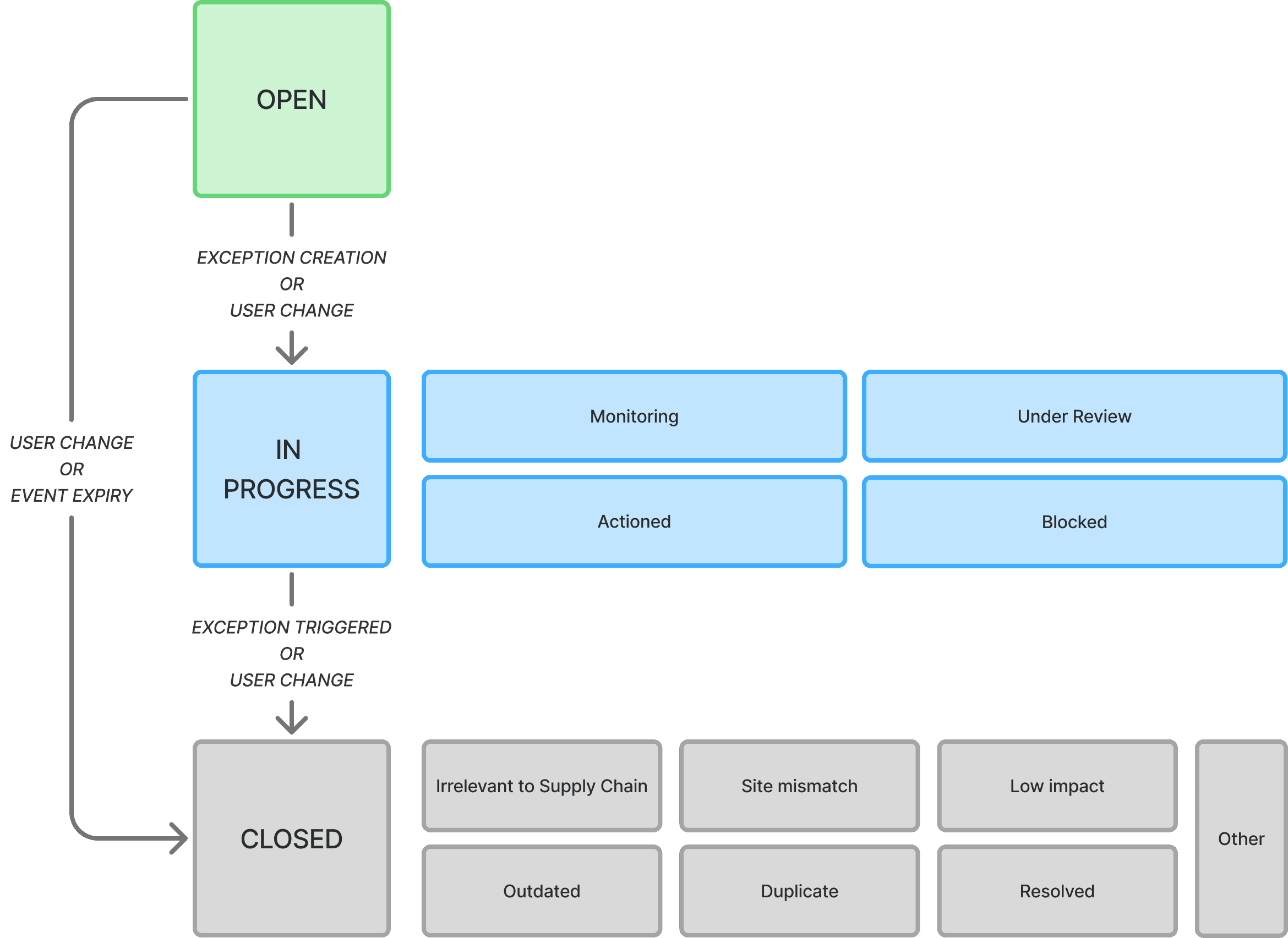
A lifecycle, not a moment
Introduced a risk lifecycle status model that:
Automatically updates based on system intelligence
Supports collaboration and human input
Gives users a clear sense of progression and state
From Passive Analysis to Guided Decision-Making
Shifted the experience from reactive analysis → proactive insight
Reduced friction in navigating complex datasets
Created a foundation for a more intelligent, adaptive interface
Maestro AI Agent
A chat-based agent that retrieves, reasons, and completes tasks from your data.
From Feature to Workflow Engine
The Maestro AI Agent had strong potential, but the experience felt disconnected across its two key audiences: authors and planners.
A split experience
Authoring and usage lacked continuity, creating gaps in how agents were built and experiencedLimited context for AI
The system lacked ways to incorporate external knowledge, reducing answer qualityUnclear interaction patterns
Users didn’t always know how to engage—ask a question, or complete a task?AI as a black box
Responses lacked transparency, leading to long wait times and low trust
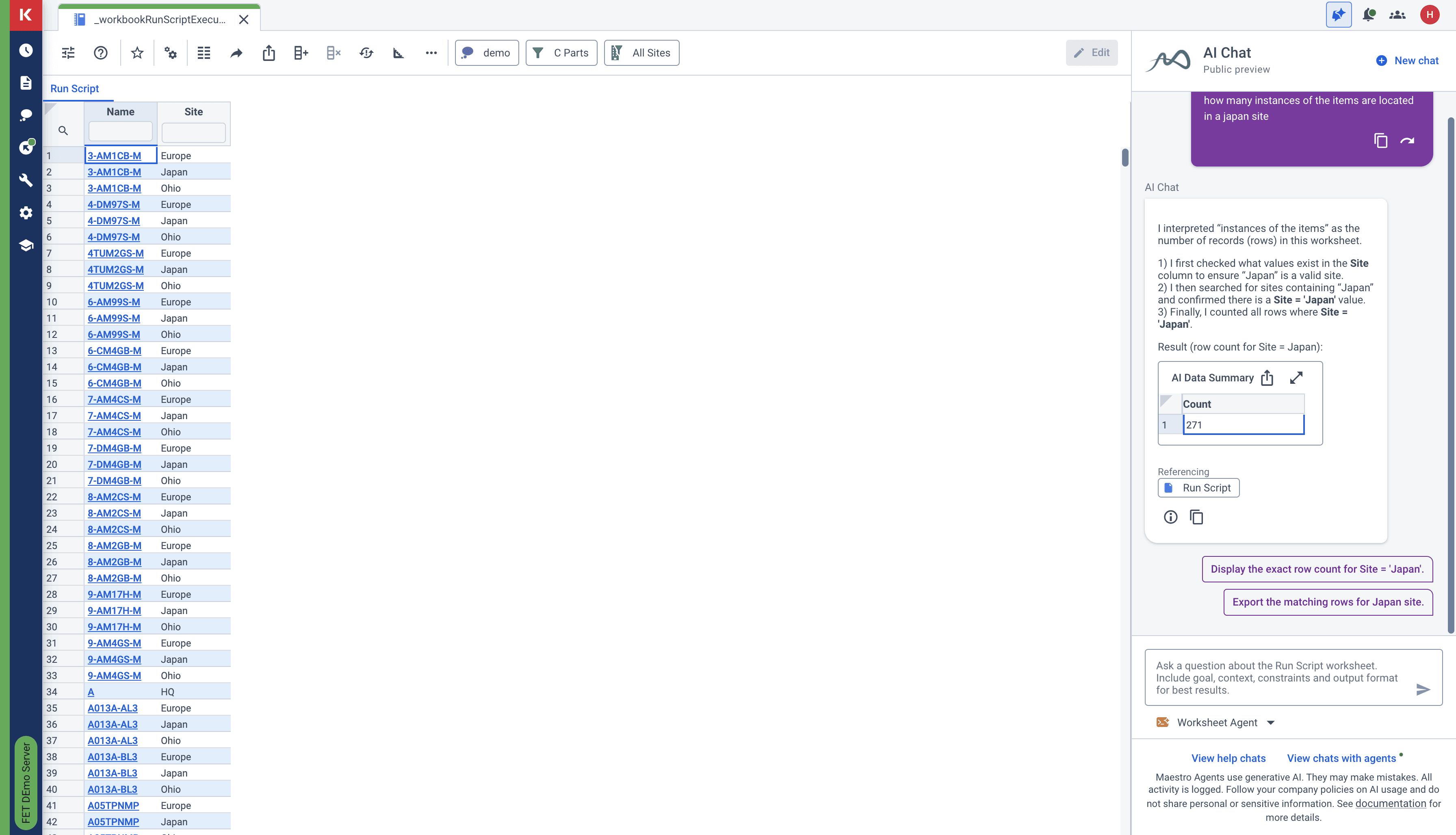
The opportunity: transform the agent into a system that supports both creation and execution seamlessly.
Designing an End-to-End Agent Experience
I approached the AI Agent as a connected system, improving both:
The authoring layer (how agents are created and enriched)
The user layer (how planners and administrators interact and get work done)
The goal: Move from a generic chat experience → to a task-oriented, intelligent assistant
Bridging Creation and Use
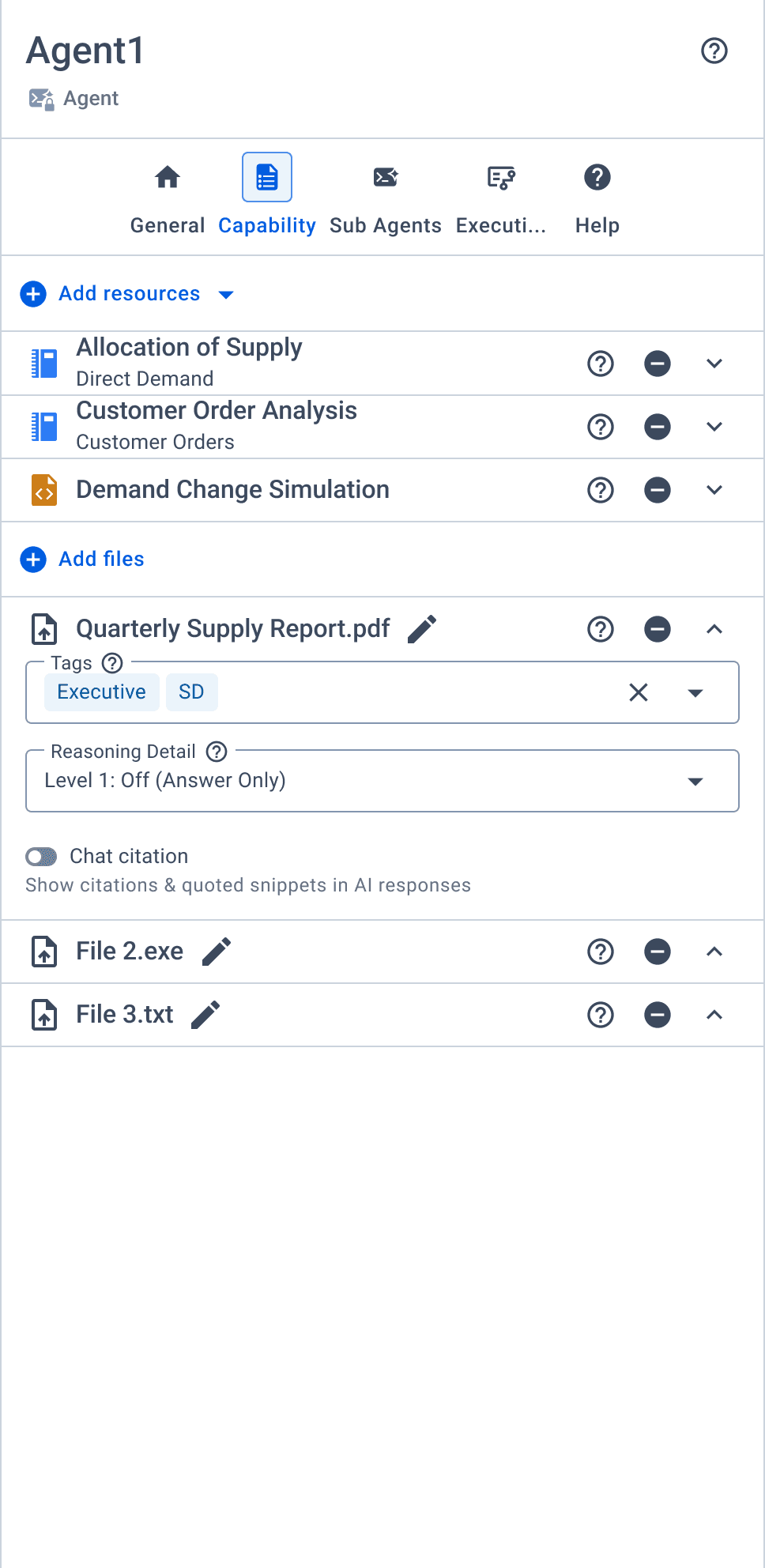
Expanding the agent’s knowledge
Introduced document upload capabilities:
Authors can upload documents to enrich agent knowledge
Planners can upload files to ask contextual questions
Enables more relevant, grounded AI responses
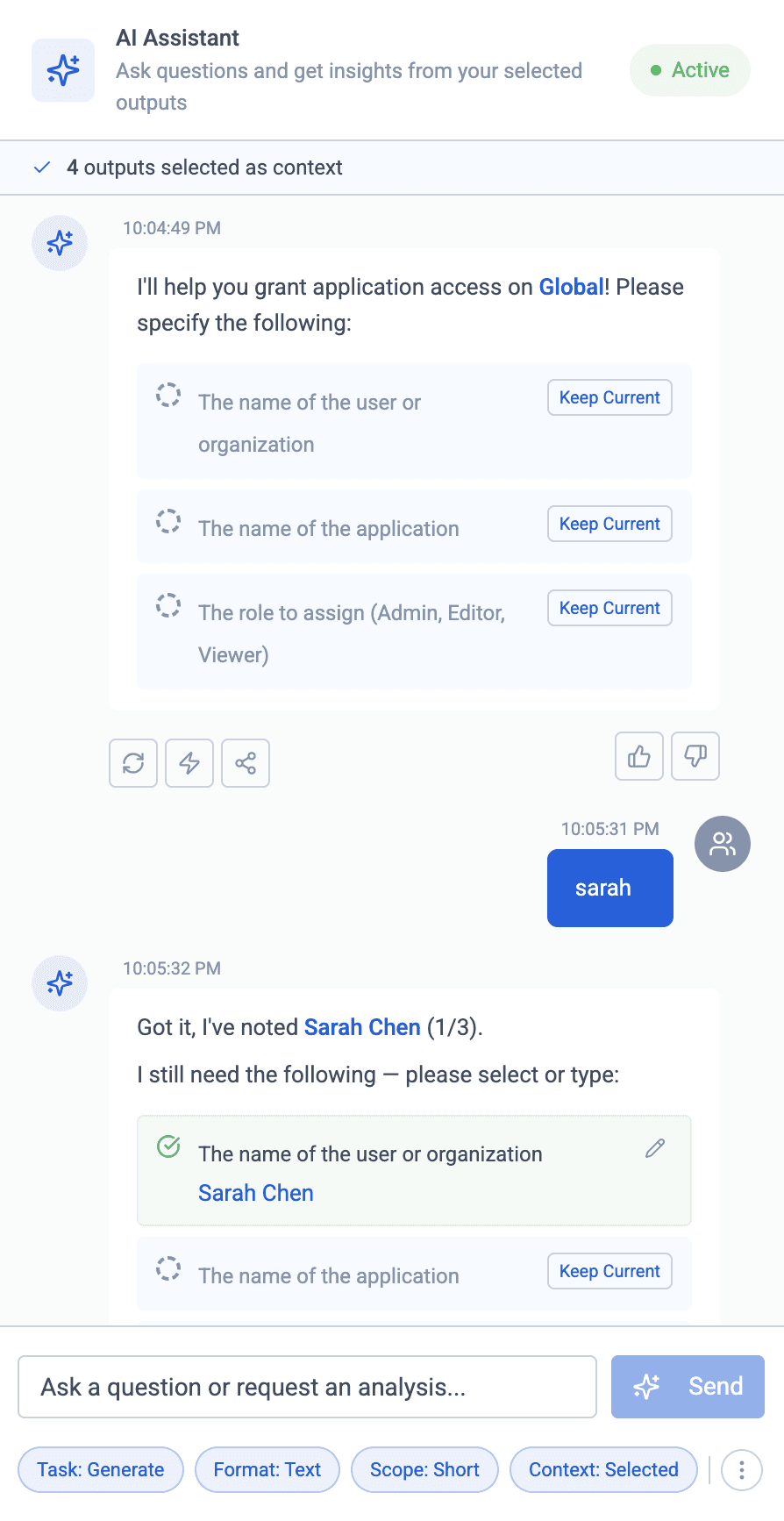
Designing 0→1 AI chat for Admin Console
Defined the foundational interaction model, including two core inquiry types:
Insight-based inquiries → understanding, explaining, exploring
Task-based actions → completing workflows, executing steps
Established distinct patterns, capabilities, and system behaviors for each, enabling users to seamlessly move between getting answers and taking action within a single experience
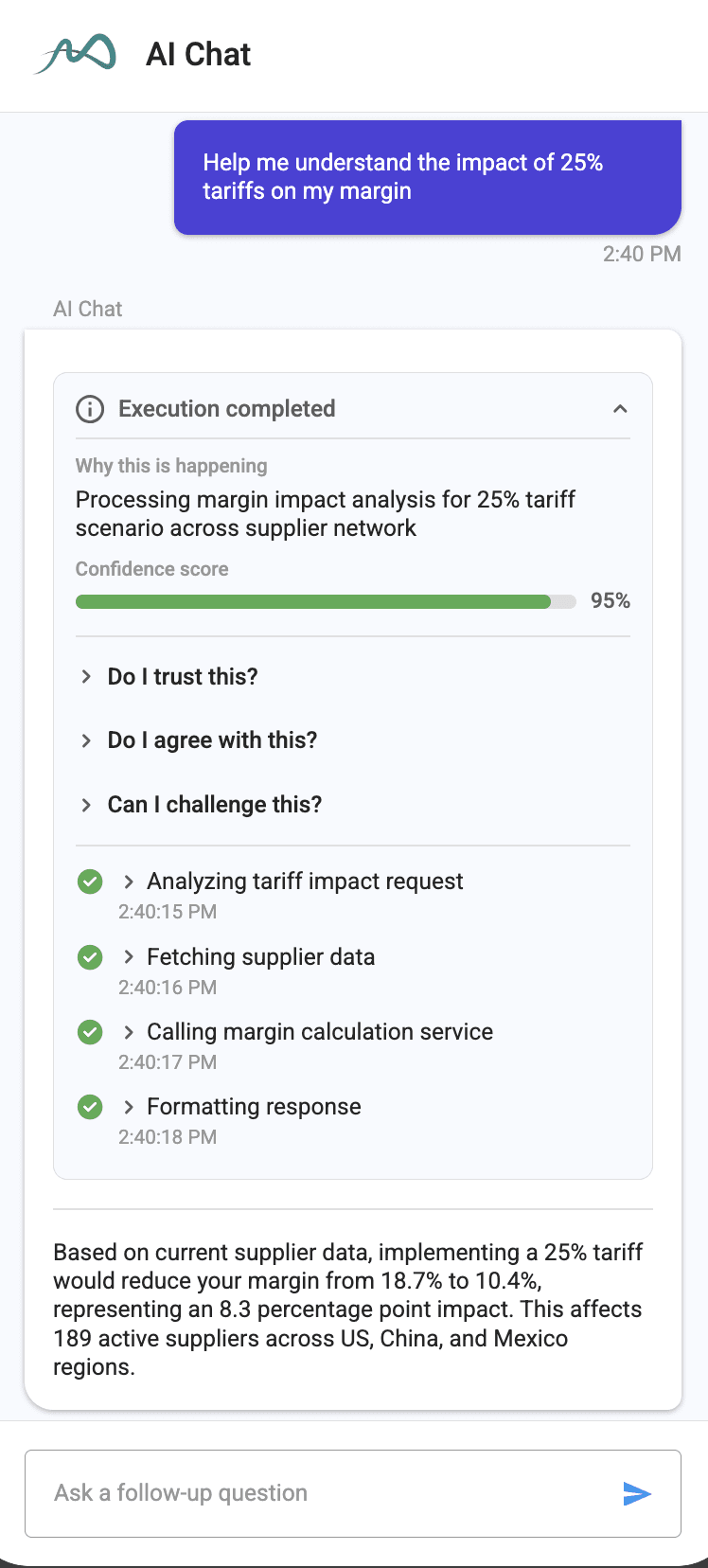
Making AI reasoning visible
Reworked response structure to:
Eliminate long, opaque wait times
Replace black-box outputs with structured reasoning
Improve trust by showing how conclusions are formed
From Chat Interface to Intelligent Assistant
Created a more cohesive experience across authors and planners
Improved clarity in how users interact with AI
Increased trust through transparency and structured responses
Positioned the agent as a reliable partner in task completion, not just a chatbot
Maestro Insights Report
The Maestro Insights Report is a dashboard-based experience that helps customers understand how they use Kinaxis’s platform.
The Data Overload Problem
However, the existing reporting experience created more friction than clarity:
Inaccessible and hard-to-read reports
Users struggled to extract meaning from dense, outdated visualizationsRigid and unintuitive structures
Fixed settings and unclear terminology limited explorationLow confidence in decision-making
Insights existed, but were not surfaced in a meaningful way
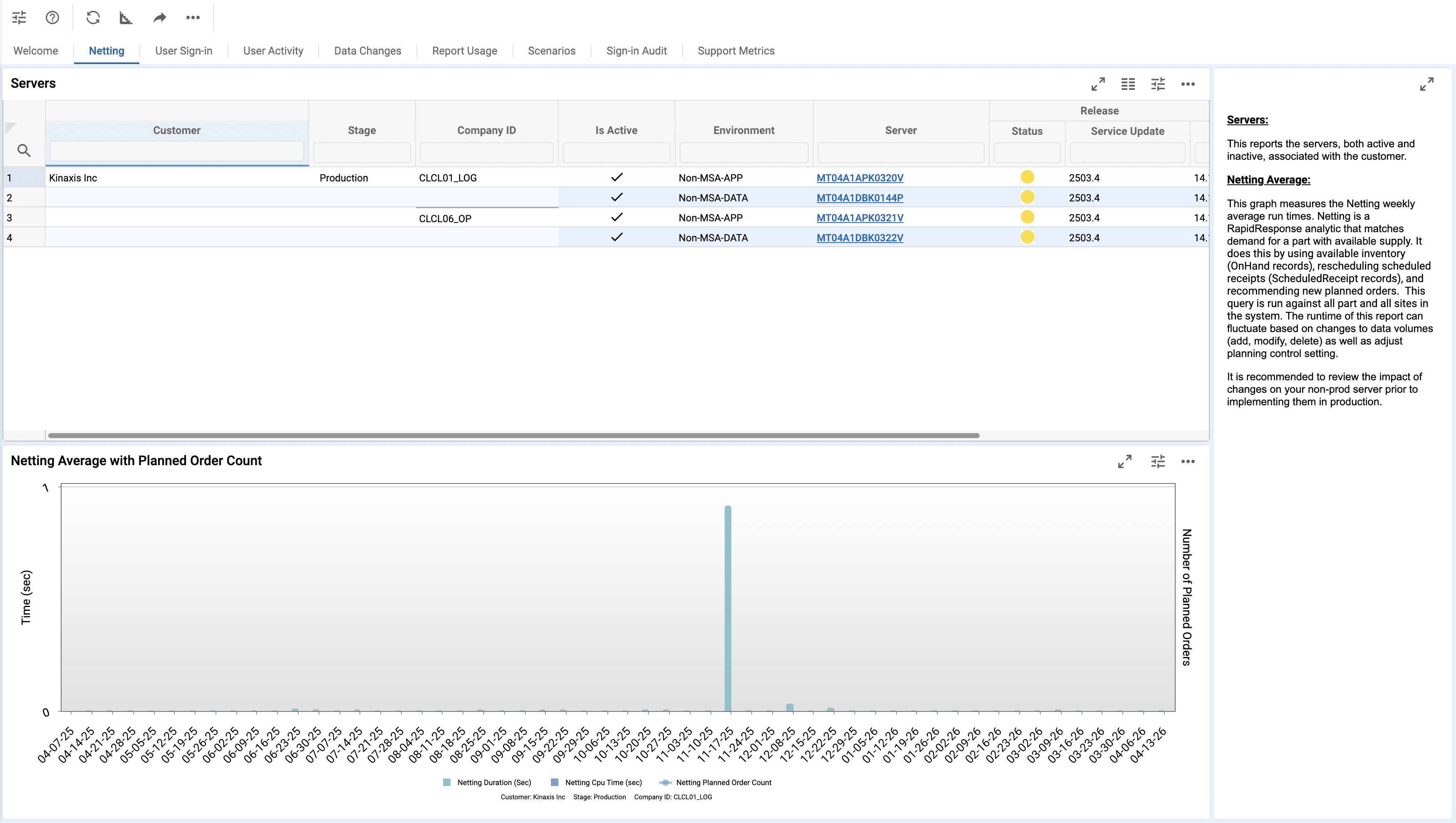
With the migration to Looker, there was an opportunity to completely rethink how insights are presented and consumed.
Rebuilding Clarity Into Reporting
As my first onboarding project, I focused on modernizing the experience while improving usability and decision-making speed.
The goal: Transform reporting from a static data dump → into a flexible, readable insight system
Making Data Usable, Not Just Available
Modernizing the visual system
Applied the latest design system to:
Replace outdated and inconsistent visuals
Improve hierarchy and readability
Create a more cohesive reporting experience
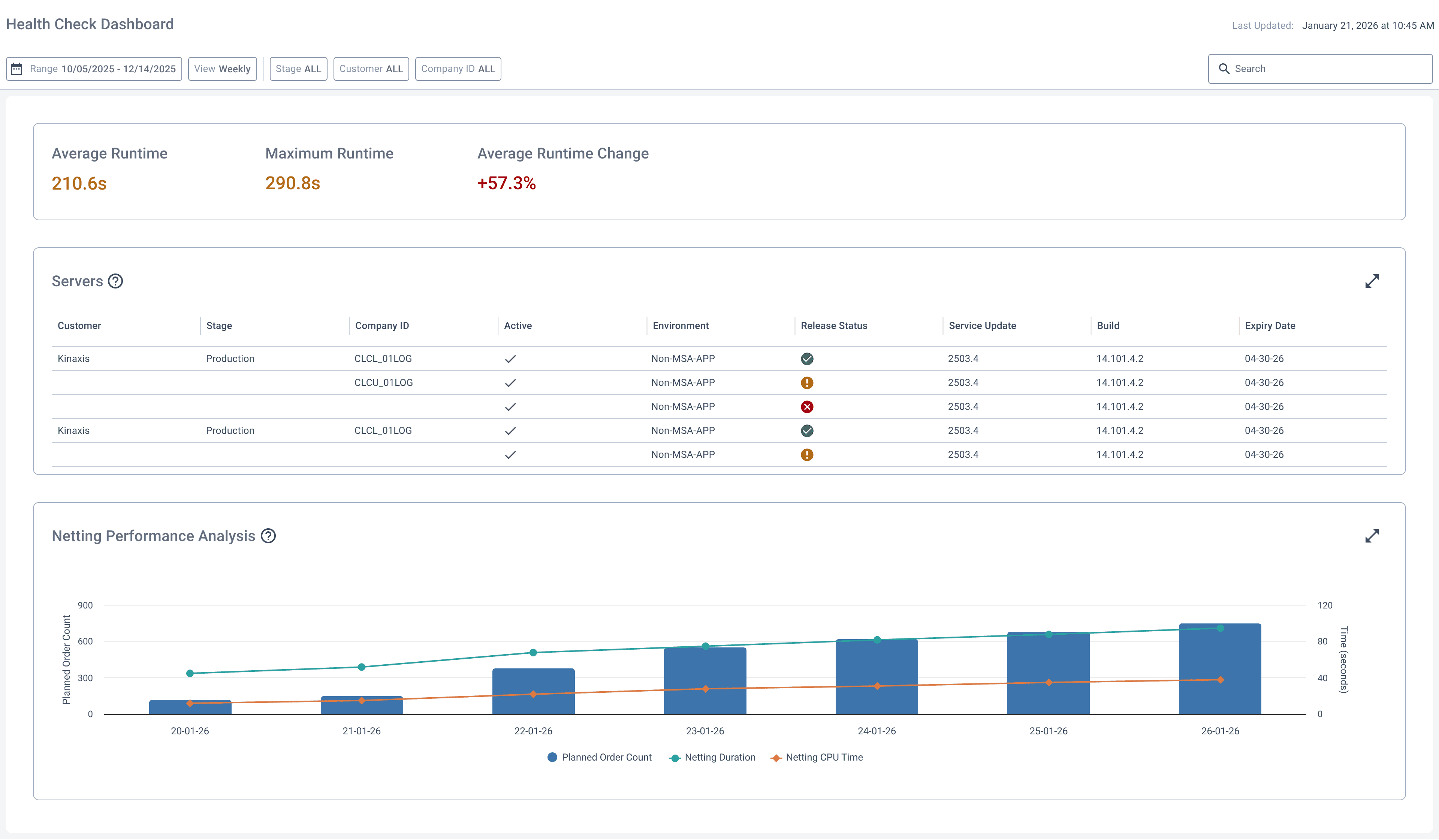
Surfacing what matters most
Reframed the dashboard to support faster decisions by:
Identifying and prioritizing key insights
Reducing noise from non-essential data points
Guiding users toward meaningful interpretation

Enabling flexible exploration
Introduced improved data interaction tools:
Expanded filtering capabilities
More intuitive date range selection
Greater control over how users explore usage data

From Static Reports to Adaptive Insight Tools
Improved readability and visual consistency across reports
Enabled faster interpretation of key usage insights
Increased flexibility in how users explore and analyze data
Helped reposition reporting as a decision-support tool rather than a static dashboard
LEARNINGS
Lessons learned
Over the course of the past few months, I learned how to leverage AI across the end-to-end design process—from early discovery to final execution. I grew in how I approach ambiguity, adapt to complex systems, and collaborate across teams, all while balancing user needs with real-world constraints.
AI across the design process
I learned to integrate AI throughout the full design lifecycle—not just as a feature, but as a tool for ideation, exploration, validation, and execution.
Collaboration in practice
Working cross-functionally and directly with clients pushed me to communicate clearly, align on goals, and translate complex requirements into thoughtful design solutions.
Adapting to complexity
Navigating large, complex systems taught me how to ramp up quickly, stay flexible, and make informed decisions even with incomplete information.
Applying AI best practices
I developed a strong understanding of AI design principles—focusing on clarity, transparency, and usability to create experiences that users can trust and effectively act on.